Skip to main content
Invoicing Release Notes: August 2026
Derived Fee (Invoice Percentage Fee)
- What - Added a new Derived Fee fee type that allows agencies to configure named percentage-based fees, such as state surcharges or municipal fees, which are automatically calculated as a percentage of an invoice subtotal. Derived Fees can be attached to permit types, added to manual invoices, automatically applied to online portal invoices, support multiple independent percentage fees on a single invoice, and automatically recalculate whenever eligible invoice line items or discounts change.
- Why - This enhancement simplifies the collection of percentage-based supplemental fees by eliminating manual calculations and ensuring fee amounts remain accurate as invoices are modified. Automatic recalculation helps maintain consistent totals across manual and online invoice workflows while reducing administrative effort and calculation errors.
- How
- Navigate to Invoicing > Fee Schedule.
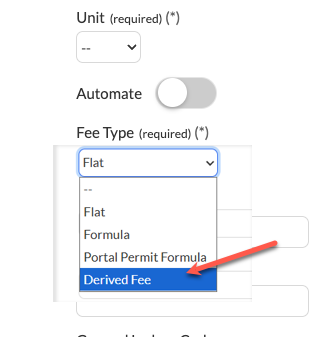
- Create or edit a line item and select Derived Fee as the Fee Type.
- Configure the fee using the existing Fee Formula field with the INVOICE_TOTAL placeholder and the desired decimal percentage (for example,
INVOICE_TOTAL*.03). - Save the line item and attach it to the appropriate permit type if it should be applied to online submissions.
- When creating or editing a manual invoice, add the configured Derived Fee from the Add Line Item list as needed.
- Derived Fees automatically recalculate whenever standard line items or discounts are added, removed, or modified while the invoice remains editable.
- Note: Derived Fees are unavailable when Automate is enabled and cannot be edited directly after being added to an invoice, although they can be removed if necessary.
- Note: Inspection auto-generated invoices and hydrant workflows are not included in this release.
- Use Case - An agency collects a 3% state surcharge on permit invoices. An administrator creates a State Fee as a Derived Fee and associates it with applicable permit types. During manual invoice creation or online permit submission, the surcharge is calculated automatically from the invoice subtotal. If staff update line items or apply a discount before payment, the surcharge is recalculated automatically, ensuring the invoice total remains accurate without requiring manual adjustments.