Skip to main content
Occupancy Release Notes - August 2026
Life Safety Systems
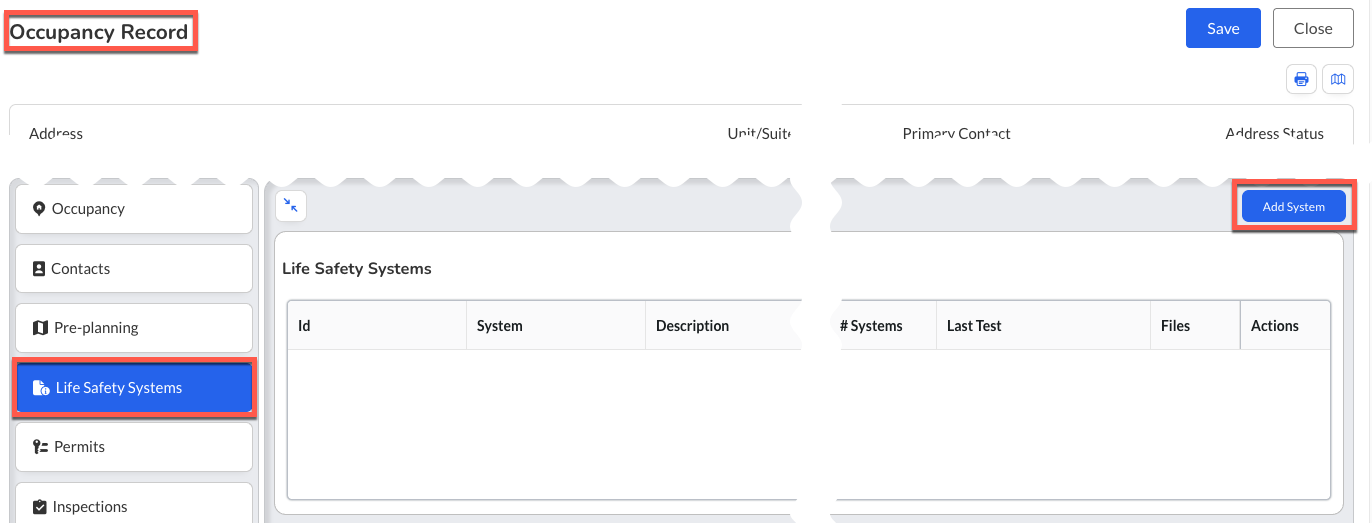
- What - Introduced the Life Safety Systems tab on the Occupancy record, providing a centralized view of life safety systems associated with an occupancy. This feature surfaces existing Pre-Plan Units that are configured as Life Safety Systems, allowing users to view, add, edit, and delete applicable systems directly from the Occupancy record while leveraging the existing Pre-Plan data model without creating duplicate records.
- Why - This enhancement streamlines inspection and prevention workflows by providing direct access to life safety system information without requiring navigation through tactical Pre-Planning workflows. It improves visibility into critical occupancy systems, maintains consistency with existing Pre-Plan functionality, and establishes a scalable foundation for future Inspect, Test, and Maintain (ITM) capabilities.
- How
- Navigate to Occupancies and open the desired Occupancy record.
- Select Life Safety Systems from the left-side navigation menu.
- Review existing systems associated with the occupancy.
- Select + Add System to create a new Life Safety System.
- Complete the standard Pre-Plan Unit form and select a Unit Type configured as a Life Safety System.
- Select Accept to save the record.
- Use the Edit or Delete actions from the system row to update or remove existing records.
- Note: The Life Safety Systems tab displays only Pre-Plan Units whose Unit Type has the Life Safety System flag enabled.
- Note: Changes made from either the Life Safety Systems tab or the standard Pre-Plan interface update the same underlying record.
- Note: Access is controlled by existing Pre-Plan permissions. Users with Pre-Plan Read can view records, while Pre-Plan Edit is required to add, modify, or delete systems.
- Use Case - During a fire inspection, an inspector can quickly review all life safety systems associated with an occupancy, update system information, attach supporting documentation, or add newly identified systems without leaving the Occupancy record. Because the information is shared with the existing Pre-Plan records, both prevention and response personnel work from the same up-to-date data.