Purpose
The Personnel Health Information Privacy Controls within the Health & Wellness module provide an additional layer of privacy when viewing and managing personnel information associated with an exposure.
These controls determine whether a user can view, edit, or delete personnel exposure information based on their assigned permissions.
This article compares the access available to Firefighters and Administrators/Supervisors when working with the Personnel Exposed section of an exposure record.
Background Information
Within the Health & Wellness module, exposure records can contain information for multiple personnel involved in the same incident or exposure.
The Personnel Health Information Privacy Controls help protect individual personnel information by restricting access based on user permissions.
- Administrators/Supervisors: Users with the appropriate permissions enabled can view, edit, and delete personnel information for all individuals listed within an exposure.
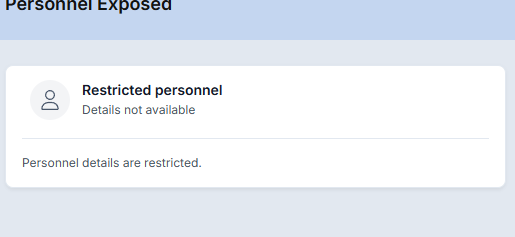
- Firefighters: Users with restricted permissions can only view, edit, and delete their own personnel exposure information. Information belonging to other personnel is restricted, including the identity of those individuals.
These restrictions allow personnel to manage their own exposure information while limiting access to other individuals' records.
Required Permissions
The Personnel Health Information Privacy Controls are managed through the Permissions area of the Admin module.
The permissions assigned to a user's role determine their level of access to personnel information within an exposure.
Administrator/Supervisor Access
The appropriate permissions must be enabled to allow users to view, edit, and delete personnel information for all individuals associated with an exposure.
Firefighter/Personnel Access
Users with restricted personnel information permissions can only access and manage their own information within an exposure.
Video
Permission Comparison
The following table outlines how access differs between an Administrator/Supervisor with elevated permissions and a Firefighter with restricted permissions.
| Action | Administrator / Supervisor | Firefighter |
|---|---|---|
| View own personnel exposure information | Allowed | Allowed |
| Edit own personnel exposure information | Allowed | Allowed |
| Delete own personnel exposure information | Allowed | Allowed |
| View other personnel exposure information | Allowed | Restricted |
| Edit other personnel exposure information | Allowed | Restricted |
| Delete other personnel exposure information | Allowed | Restricted |
| Identify other personnel listed in an exposure | Allowed | Restricted |
Important: Administrator/Supervisor access in this comparison assumes the appropriate permissions have been enabled for the Role. Access is determined by the assigned permissions through the Admin Module under Roles & Permissions.
Comparing Permission Levels Within an Exposure
1. Navigate to the Exposure List
1. Open the Health & Wellness module.
2. Select Exposure List.
3. Open an existing exposure or create a new exposure.
4. Locate the Personnel Exposed section within the exposure record.
2. Administrator/Supervisor View
When logged in as an Administrator or Supervisor with the appropriate permissions enabled, the user has access to personnel information for all individuals listed in the exposure.
From the Personnel Exposed section, the user can:
View personnel exposure information for any listed individual.
Edit personnel exposure information for any listed individual.
Delete personnel exposure information for any listed individual.
Identify the personnel associated with each exposure entry.
This permission level allows authorized personnel to manage exposure information for multiple individuals within a single record.
3. Firefighter View
When accessing the same exposure as a Firefighter with restricted permissions, the available information is limited.
From the Personnel Exposed section:
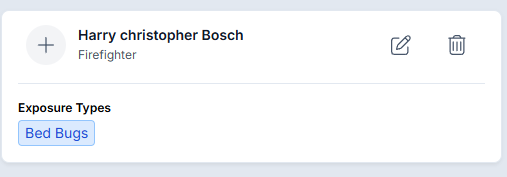
The Firefighter can view their own personnel exposure information.
The Firefighter can edit their own personnel exposure information.
The Firefighter can delete their own personnel exposure information.
Information belonging to other personnel is restricted.
The Firefighter cannot identify the individuals associated with restricted personnel entries.
These restrictions apply even when multiple individuals are associated with the same exposure record.
4. Understanding the Privacy Controls
The Personnel Health Information Privacy Controls allow organizations to limit access to individual personnel information without preventing users from managing their own exposure records.
The primary difference between the two permission levels is the ability to access and manage other personnel's information within an exposure.
Best Practices
- Assign permissions based on responsibilities: Only provide elevated personnel information access to users who require it for their assigned duties.
- Protect personnel privacy: Use restricted permissions for users who only need to manage their own exposure information.
- Review administrative access: Verify that Administrators and Supervisors have the appropriate permissions before expecting them to manage information for other personnel.
- Test permission levels: When configuring these controls, compare the same exposure using accounts with different permission levels to verify the intended access.
Troubleshooting & FAQs
Why can a Firefighter only see their own personnel exposure information?
The Personnel Health Information Privacy Controls restrict access based on the user's assigned permissions. Firefighters with restricted access can only view and manage their own information.
Why can't a Firefighter see the names of other personnel listed within an exposure?
The privacy controls prevent restricted users from identifying personnel associated with other exposure entries.
Can a Supervisor view and edit all personnel exposure information?
Yes, provided the Supervisor has the appropriate permissions enabled within the Admin module.
Can a Firefighter delete their own personnel exposure information?
Yes. In the demonstrated restricted permission configuration, Firefighters can view, edit, and delete their own personnel exposure information.
Where are these privacy permissions managed?
These permissions are managed through the Permissions area of the Admin module.