Skip to main content
Web Responder: Release Notes May 2026
Coming Soon
Feature Enhancements
Incident List Header and Refresh Controls
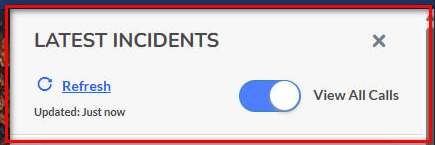
- What - Updated the incident listing header to improve clarity and usability. The previous collapse control was removed, the header text was changed to Showing latest incidents, a dedicated Close button was added on the right side of the header, and the toggle control was moved below the header. Additional improvements also introduced a dedicated Refresh button and a visible Last Updated timestamp so users have clear feedback about when incident data was last refreshed.
- Why - This change was made to reduce confusion around how to interact with the incident list header and to provide clearer, more intuitive controls for managing the view. By separating actions such as closing, toggling, and refreshing into distinct interface elements, the update improves overall usability and helps users better understand how to access the most current incident information.
- How
- Open the incident details view within the Responder View.
- Review the updated header labeled Showing latest incidents.
- Use the Close or 'X' button in the top-right area to close the panel.
- Use the 'View All Calls' toggle positioned below the header to expand or collapse the All Calls View as needed.
- Select Refresh to manually update the incident listing data.
- Review the Last Updated timestamp to confirm when the information was most recently refreshed.
- Note: The timestamp is based on the page load time and updates each time the Refresh button is selected.
- Use Case - A dispatcher or responder reviewing active incidents can now clearly distinguish between informational headers and actionable controls, use the dedicated Refresh button to ensure they are viewing the most current data, and rely on the Last Updated timestamp to verify recency before making operational decisions. This creates a more intuitive and efficient workflow during time-sensitive situations.
Fixes
- No fixes included in this release.