Purpose Statement
The audit log for user roles provides comprehensive tracking of all role-related changes within the First Due platform. This feature maintains a complete history of modifications to user permissions and role assignments, ensuring accountability, compliance, and transparency in system administration. The audit log enables administrators to monitor who made changes, what changes were made, and when these changes occurred, supporting both security oversight and troubleshooting efforts.
Background Information
User role audit logging is a critical component of system security and compliance in emergency services organizations. Fire and EMS departments must maintain detailed records of user access changes to ensure proper authorization levels, meet regulatory requirements, and support internal auditing processes. The audit log serves as a permanent record that can be referenced during security reviews, compliance audits, or when investigating unauthorized access issues. This feature is particularly important in multi-user environments where multiple administrators may be managing user permissions and role assignments across different shifts and departments.
Required Permissions
To view and access user role audit logs, users must have:
- Roles
Video
Step-by-Step Guide
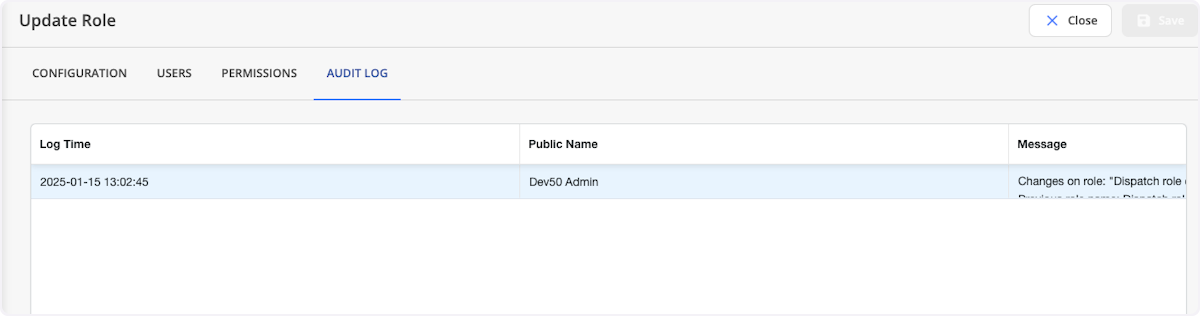
1. The audit log maintains a history of the particular role by keeping track of the user making the change, the change itself, and the date and time the change occured. These changes include:
Permission changes.User changes.
Best Practices
Regular Audit Reviews:
- Establish a schedule for reviewing role audit logs (weekly, monthly, or quarterly)
- Assign specific administrators to conduct regular audit log reviews
- Document any unusual or unauthorized changes immediately
Change Documentation:
- Require administrators to document the reason for role changes in separate change management systems
- Maintain correlation between audit log entries and change requests or tickets
- Ensure all role modifications are approved through proper channels before implementation
Security Monitoring:
- Monitor for changes made outside of normal business hours
- Watch for rapid or bulk changes that might indicate unauthorized access
- Set up alerts for critical role modifications if your system supports this functionality
Compliance Preparation:
- Regularly export audit log data for compliance reporting
- Maintain audit logs according to your organization's retention policies
- Ensure audit log data is included in backup and disaster recovery procedures
Troubleshooting & FAQs
Q: Why can't I see the audit log for a specific role? A: Verify that you have the necessary permissions to view audit logs. Contact your system administrator if you believe you should have access but cannot view the logs.
Q: Can audit log entries be deleted or modified? A: No, audit log entries are typically immutable to maintain their integrity for security and compliance purposes. If you believe there's an error in an audit log entry, contact First Due support.
Q: What should I do if I notice unauthorized changes in the audit log? A: Immediately report any unauthorized changes to your security team or system administrator. Document the specific changes and consider temporarily restricting access to the affected roles until the issue is resolved.
Q: Why does clicking Save take me out of the role interface? A: This is the intended behavior to ensure proper session management and prevent accidental changes. Always complete all necessary work within the role before clicking Save.