Purpose Statement
This feature allows departments to control which IP addresses users can access the First Due system from, providing an additional layer of security for sensitive emergency services data. Users must submit approval requests for new IP addresses before they can access the system from those locations.
Background Information
IP address restrictions help departments maintain strict security controls over system access, particularly useful for agencies with specific cybersecurity requirements or those handling sensitive operational data. This feature is commonly used by departments that want to limit access to specific office locations, fire stations, or approved remote work locations. The approval process ensures administrators maintain oversight of all access points while allowing flexibility for legitimate use cases.
Required Permissions
- End Users: No special permissions required to submit IP address requests
- Administrators: User management permissions required to approve or deny IP address requests
- Department Setup: This feature must be enabled by First Due Support before it can be used
Video
Step-by-Step Guide
For Users Requesting IP Address Approval:
- Navigate to the First Due login page
- Access your department's First Due system login page
- Enter your email address and password in the designated fields

- Initiate the sign-in process
- Click the "Sign In" button
- If accessing from an unapproved IP address, you will be prompted for a request
- Submit your IP address request
- In the reason field, type a clear explanation for why you need access from this IP address
- Include details such as location (home office, station, etc.) and purpose
- Click the "Request" button to submit your approval request
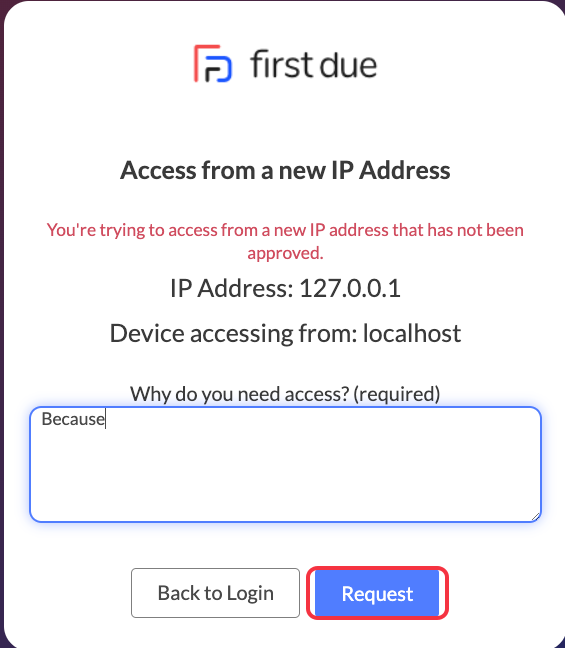
- Confirmation of request submission
- A confirmation message will appear indicating your request has been submitted
- Note that you cannot access the system until an administrator approves your request

Best Practices
For Users:
- Provide detailed, specific reasons when requesting IP address approval
- Include your location and intended use in the request description
- Submit requests in advance of when you need access to avoid delays
- Contact your administrator if you have urgent access needs
Security Considerations:
- Avoid approving public Wi-Fi or shared network IP addresses
- Coordinate with your IT department on IP address management policies
Troubleshooting & FAQs
Q: My request was denied - what should I do? A: Contact your department administrator to discuss the denial reason and potential alternatives that meet security requirements.
Q: I'm getting locked out from my approved IP address - what happened? A: IP addresses can change due to network configuration updates. Submit a new request or contact your administrator if your previously approved address is no longer working.
Q: How long does approval typically take? A: Approval times depend on your department's policies and administrator availability. Contact your administrator for urgent access needs.
Q: Can I request multiple IP addresses? A: Yes, submit separate requests for each IP address you need approved, providing justification for each location.
Q: The request form isn't loading - what should I try? A: Clear your browser cache and try again. If issues persist, try a different browser or contact support.
Q: I didn't receive a confirmation message - was my request submitted? A: Check that your request was submitted successfully and contact your administrator if you're unsure about the status.