Purpose Statement
The Mutual Aid Apparatus feature enables fire departments to document and track apparatus from neighboring agencies that provide assistance during incidents. This functionality ensures accurate NERIS reporting, maintains comprehensive incident records, and streamlines the documentation process for mutual aid responses—whether your department is providing aid to others or receiving aid from external agencies.
Background Information
Mutual aid is a critical component of emergency response, allowing departments to share resources during large-scale incidents, simultaneous calls, or when specialized equipment is needed.
Common Use Cases:
- Multi-alarm fires requiring additional apparatus from neighboring departments
- EMS incidents requiring ambulance support from mutual aid agencies
- Specialized response needs (hazmat, technical rescue, aerial operations)
- Simultaneous incidents depleting available department resources
- Automatic aid agreements with adjacent jurisdictions
Required Permissions
To add and manage mutual aid apparatus in First Due, users must have the following permissions:
Required:
- Admin Access - Ability to access the Admin section and Apparatus List
- Apparatus Management - Permission to create, edit, and configure apparatus records
Video
Step-by-Step Guide
1. Click on Admin.

2. Click on Apparatus List.

3. Click on New Apparatus.

4. Change Owner Type to "Aiding".

5. Complete all required fields, then click Create to save the apparatus record.
Fields marked with an asterisk (*) are required.
6. Click on Incident Documentation and scroll down to click on Fire Incident Setup.

7. Click on Response, locate Resources sub section.
Do you want to document detailed Aiding Apparatus Information for Aid Received calls?
Select Yes if you want to capture comprehensive apparatus details when receiving mutual aid. Select No if you prefer simplified mutual aid documentation.
8. When you select "Yes" for Aid Given/Received and enable detailed documentation, the "Aid Direction" option will become available.
Select "Given" for aid provided by your department or "Received" for aid provided to your department.
9. When you select "Received" the next step is to select Aid Type.
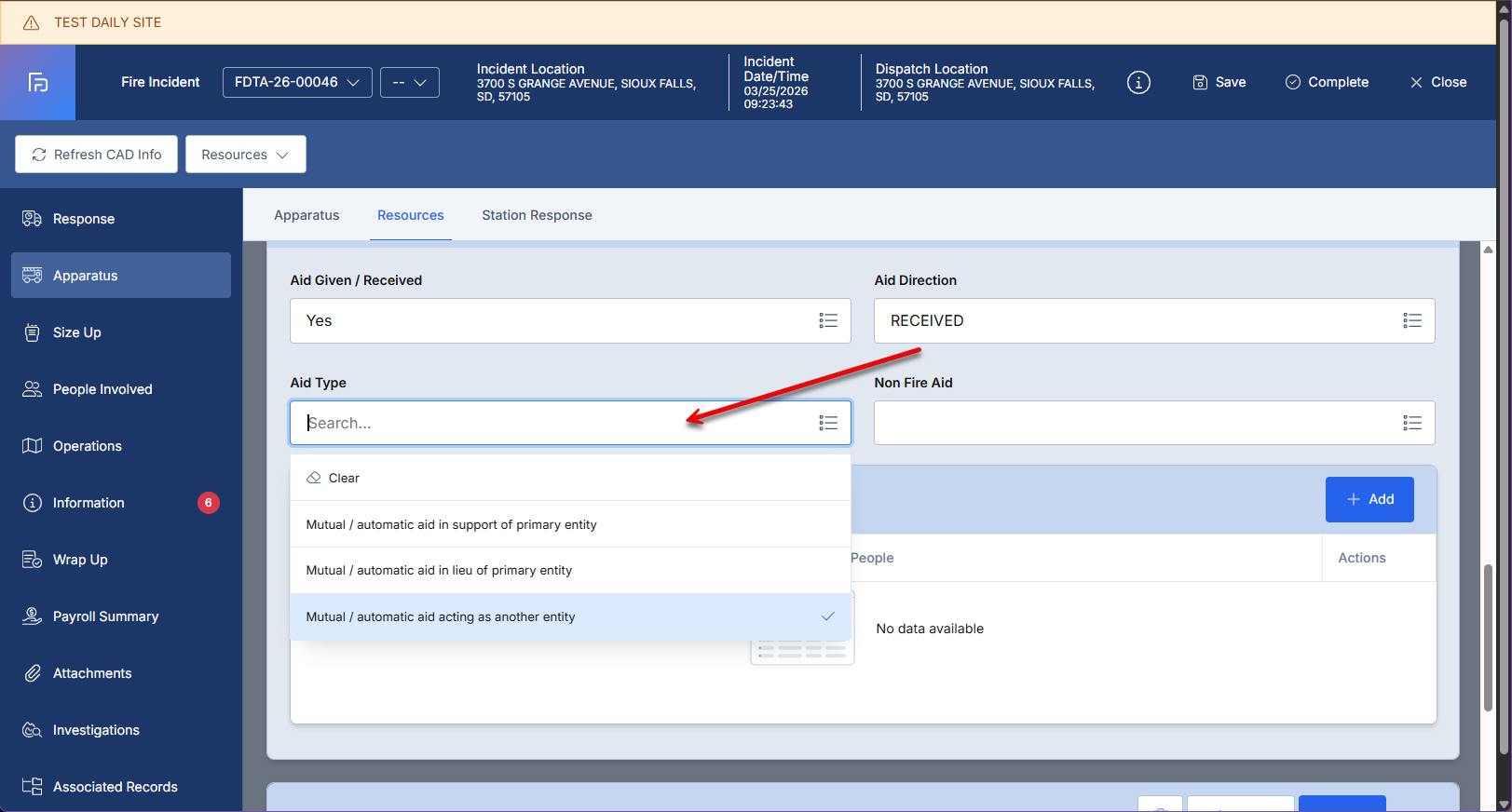
10. Select "+ Add" button under Aiding Apparatus to capture Apparatus details.
11. Select the Aiding Apparatus.
The Apparatus Details fields will automatically filter to display only apparatus belonging to that department.
12. If you selected "No" for detailed documentation, you would see the following simplified fields: Aid Type and Aiding Department Name only.
Best Practices
Do:
- Create apparatus records proactively - Pre-configure mutual aid apparatus from agencies you frequently work with to streamline incident documentation
- Use consistent naming conventions - Match the apparatus identifiers used by the aiding agencies to avoid confusion
- Coordinate with neighboring departments - Verify apparatus designations and capabilities with mutual aid partners
- Review mutual aid agreements - Ensure your documentation settings align with formal mutual aid agreement requirements
- Train personnel on documentation expectations - Ensure field users understand which mutual aid information must be captured during incidents
- Update apparatus records regularly - Keep mutual aid apparatus information current as agencies update their fleet
- Leverage CAD integration - Work with your Client Success Manager to automate mutual aid apparatus data population from your CAD system
Don't:
- Create duplicate apparatus records - Check the Apparatus List before creating new mutual aid apparatus to avoid duplicates
- Omit required NERIS fields - Even with simplified documentation, ensure all mandatory NERIS elements are captured
- Use abbreviations inconsistently - Standardize how agency names and apparatus identifiers are recorded
- Forget to configure NERIS settings - The Response tab settings directly impact what information can be documented during incidents
- Neglect to communicate changes - Inform dispatch and field personnel when mutual aid apparatus configurations are updated
Common Mistakes to Avoid:
- Creating mutual aid apparatus with "Owned" instead of "Aiding" designation, which affects reporting accuracy
- Failing to coordinate apparatus identifiers with mutual aid agencies, leading to documentation confusion
- Selecting detailed documentation without training personnel on the additional data requirements
- Overlooking the need to document mutual aid apparatus on incidents, resulting in incomplete NERIS records
Frequently Asked Questions
Q: Do I need to create a record for every mutual aid apparatus that might respond?
A: Not necessarily. You can create records proactively for frequently responding mutual aid partners or create them as needed during incident documentation. Pre-configuring common mutual aid apparatus streamlines the documentation process.
Q: Can mutual aid apparatus be assigned to automatic aid agreements?
A: Yes, mutual aid apparatus can be configured to reflect both automatic aid (predetermined response assignments) and requested mutual aid scenarios. Document your agreements in the apparatus notes field for reference.
Q: How does the documentation level setting affect NERIS reporting?
A: Selecting detailed documentation provides more comprehensive data for analysis and reporting but requires more field input. Simplified documentation captures essential NERIS elements with reduced documentation time. Both options satisfy NERIS requirements.
Q: Can I change the documentation level after incidents have been documented?
A: Yes, you can change the setting at any time. However, previously documented incidents will retain the data captured under the original setting. The new setting will apply to future incident documentation.
Q: What if a mutual aid apparatus changes its identifier or is replaced?
A: Edit the existing apparatus record to update the identifier or create a new record for the replacement apparatus. Consider marking the old apparatus as "Inactive" rather than deleting it to preserve historical incident data.
Q: How do mutual aid apparatus appear in reports and analytics?
A: Mutual aid apparatus is identified by their "Aiding" owner type and can be filtered or grouped separately in reports. This allows you to analyze mutual aid utilization, response times, and resource sharing patterns.
Q: Can field users create mutual aid apparatus records on mobile devices?
A: This depends on your department's permission configuration. Typically, only administrative users can create apparatus records. Field users can select from existing mutual aid apparatus during incident documentation on mobile devices.